Summary: This blog introduces you an excellent an excellent special effects video editor to add effects to video online for free! Catch up with us to enhance your videos.
Where there are excellent videos, there are special effects. You might not be able to notice it, but it is the special effects that differentiate an excellent video from a normal one.
Video effects sound like quite mysterious for green hands like you. As a matter of fact, it can be as simple as an animation, or as complicated as a transition. Here in this post, we list some of the most frequently used special effects for you to decide what to use, and then show you how to add special effects to video in the easiest way. Read on to get what you want.
Can't Miss: 8 Best Video Background Music Resources >
Common Video Special Effects & How to Choose Them
Special Video Effects - Dynamic Text Animation
Dynamic text animations better attract people’s attention and add much fun to the video. You can apply them everywhere you like on the video, such as the intro, outro, titles, you can even add dynamic text animations as intertitles or subtitles.
To attract people’s attention, you might choose Bounding Rectangle, Center Stage; to express sadness, you need Fade Together; to show happiness or vibration, Wipe Out is the best choice. Dynamic text animations with a line are mostly applied to tutorial videos. Anyway, the dynamic text animations that fit the video are the best

Image Board: Special Video Effects - Dynamic Text Animation
Special Video Effects - Transition
A complete video, be it a 2-hour-long Hollywood movie, or a 2-minute-long, is composed of a number of single shots, and it is the transition that combines them together.
Five types of video transitions are applied frequently, they are Fade in/out, dissolves, wipes, wipe pan, zoom. As is shown on all videos, Fade in/out transition can best emphasize the scene or create a sense of ambiguity. A Dissolve works well to overlap two similar scenes. The Wipe transition is often used to show stories happening in different places or establish conflict. The whip pan is similar to the whip but tends to be faster. The zoom can create a comedic effect.

Image Board: Special Video Effects - Transition
Special Video Effects - Filter
We might all know that horror movies are of cold tone, the romance movie tends to apply many warm colors. The right tone takes viewers to the right mood and brings resonance.
We might all know that horror movies are of cold tone, the romance movie tends to apply many warm colors. The right tone takes viewers to the right mood and brings resonance.
Never mind if you didn’t match colors very well before shooting. A filter can give your video a completely different look.
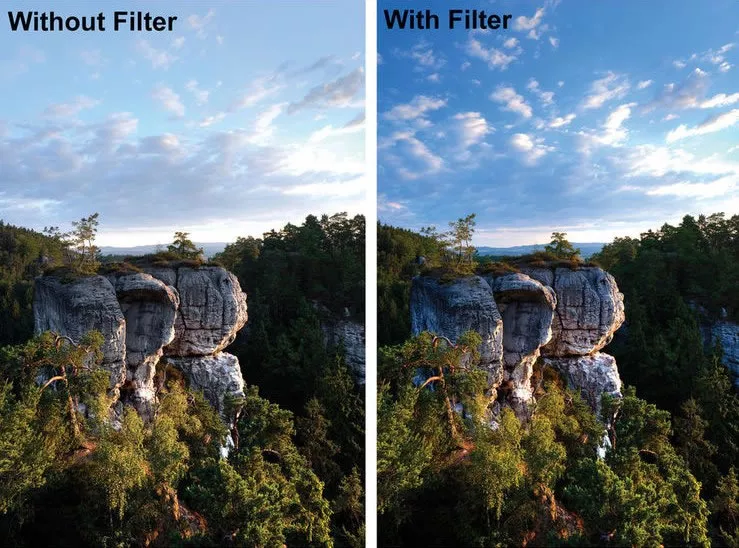
Image Board: Special Video Effects - Filter
Special Video Effects - Animation
Remember how much you like using interesting memes while chatting? The same goes to video creation. Videos with interesting widgets always spice up the fun atmosphere and help you get more likes.

Image Board: Special Video Effects - Animation
Special Video Effects - Overlay
Overlay doesn’t hide part of your video. Instead, it is an image that used as titles or clickable call to action on intros or outros. Beautiful overlay increases the chance that a video is viewed or gets likes.
Best Free Special Effects Video Editor Online
FlexClip is surely the best free special effects video editor online. You can use it to apply all special effects mentioned above to video easily. What’s better, if you don’t like the special effects you added, you can discard the change in just one click. Besides that, FlexClip is also equipped with a stock library with millions of free photos, videos and background music to help level up your video.
Now, why not click the Create a Video button to start adding transitions to video? You are also welcomed to view already-made video templates.
How to Add Cool Special Video Effects to Videos for Free
Step 1 Drag and drop all videos you want to add special effects and apply them to the storyboard. Use the "+" button will also do.
Step 2 Add special effects. FlexClip current allows you to add dynamic text, change video aspect ratio, add filters, transition, widget. Feel free to explore more.
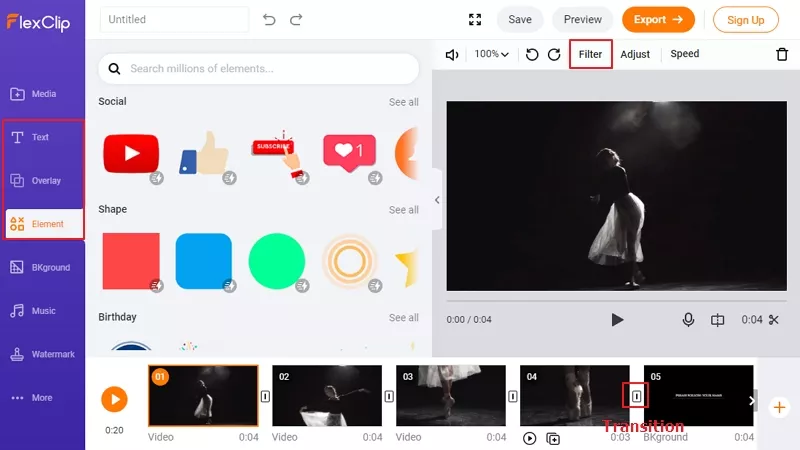
Image Board: How to Add Special Effects to Videos - Step 2
Step 3 Preview and Export. If you are satisfied with the video, save it to your computer.
The Bottom Line
This blog shows you some common special effects that can make your video stunning and the detailed steps to add special effects to videos. If you find this post helpful, please do share it with others. By the way, FlexClip can also help you make other videos. Go to its main page and have a try!




FlexClip AI Video Maker
Reach professional-quality videos faster with easy editing tools, templates, and smart AI.
Start Now for Free
Hot & Trending
-

Ultimate Tik Tok Guide – How to Tik Tok & How to Make a Tik Tok Video that Gets Likes
-

The Best Birthday Video Maker for You to Create Birthday Videos Online for Free
-

Large Collection of Creative and Funny Birthday Video Ideas for Ones You Care
-

Instagram Story Video Quality Bad After Upload? Fix It!
-

How To Remove/Reduce Background Noise? - 3 Best Free Audio Optimizers
-

Best Video Quality Enhancer: Improve Your Video Quality Easily
-

TikTok Filters Guide: How to Use Filter Effects on TikTok
-

How to Add Multiple Photos to One Instagram Story