In video media, every visual story begins with a title card, opening credits, opening sequence, or both. They have an enormous impact on establishing tone, character, plot, and even theme of a movie or show, so the opening credits or title sequences always help audiences make a critical judgment on the tone of a movie or TV shows before they begin.
The great opening credits and opening sequence sets the tone of your film and stays with audiences.
Then, how are you going to grab the audience with the fantastic opening credits and title sequence for your masterpiece? This post will show all you need to know.
Can't Miss: How to Make a Movie Trailer >
Contents:
Free Editable Opening Credits Templates

Also Read: How to Add a Subscribe Button to Your Videos>
Part 1 Opening Credits Vs. Title Sequence
Before we dive into making the opening credits for your movie or TV show, check out the definition of these two confusing terms: opening credits and title sequence.
Opening Credits: also know as opening titles, they are shown at the very beginning and list the most important members of the production, including the cast and crew, producers, studios, etc.
Title Sequence: also called an opening sequence or intro, it is a part of a TV show or movie's intro that is dedicated to crediting the cast and crew and displaying a title card, and helps establish the setting and tone of the program.
Always, the opening credits are shown as text superimposed on a blank screen or static pictures, or sometimes on top of the action in the show. And they may or may not be accompanying music.
When opening credits are built into a separate sequence of their own, we call that a title sequence. It may consist of live-action, animation, music, still images, etc.
Part 2: Best Online Title Sequence Maker to Make Opening Credits
Frankly speaking, you have many options today, many of which you can accomplish yourself, but most of them probably take hours and have a steep learning curve to add the opening credits to your movie, and may even cost a fortune.
Then you can reply on an easy-to-use yet powerful video software to add the credits to your film & TV show for free with great ease. So here comes FlexClip.
Also, it comes with ready-made movie opening credits templates that can inspire you to add the opening title and make incredible title sequence for your TV shows and movies.
Part 3: How to Make Opening Credits for Movie & TV Show
As you can see, FlexClip is a leading video editor packed with rich video editing tools and options, not only make opening credits and title sequence, just click the Get Started Now button to start adding the opening title and making incredible title sequence using a couple of features provided by FlexClip:


First, pick a template to customize your opening credits or start from scratch to upload your own footage form a local folder of your computer, or pick some stock media from the extensive library of FlexClip.
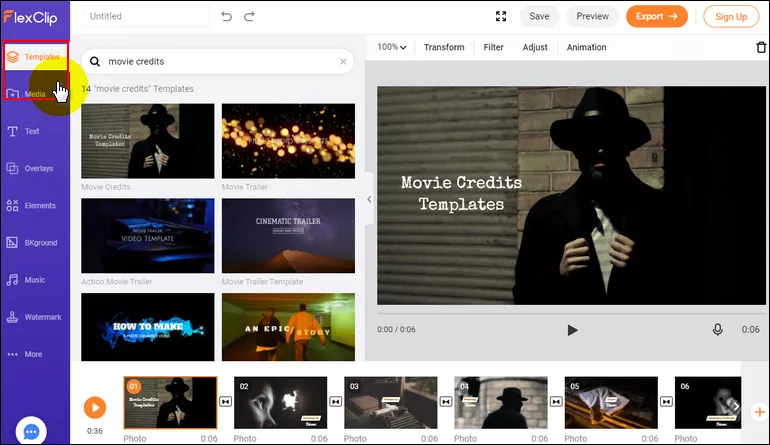
Make Opening Credits - Start with Template
Go to the text option, and there are various text styles you can use for your opening credits. Whether you need a simple one or a dynamic one, just browse through them until you find the desired text effect.
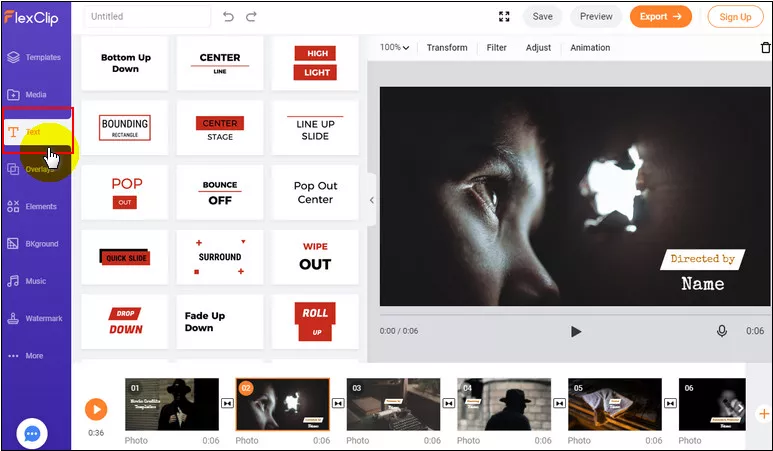
Make Opening Credits - Text Effects
Once you picked the desired text style for your opening credits, you can double click the text box and begin entering new text. And then you can customize the text on the font, color, position, and duration, etc.
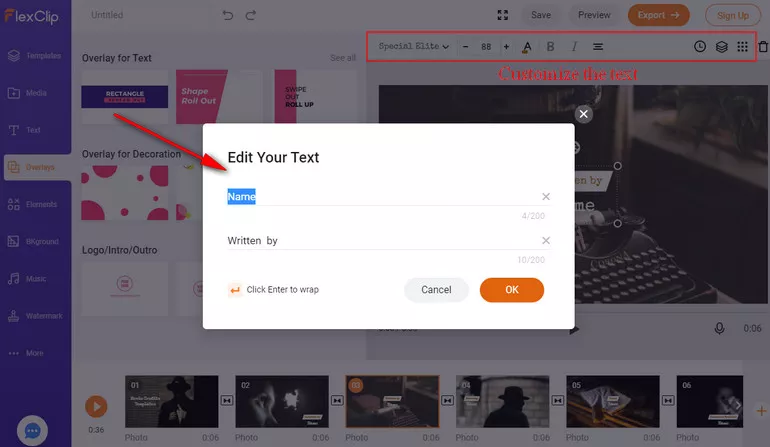
Make Opening Credits - Enter the Text and Customize
While you're in the editor, you can use FlexClip's tools to make any other edits you'd like to your title sequence:
- Add background music to the video;
- Add transition effects, filters to the video;
- Add watermark, overlays & voice over;
- Split, trim, and rotate the video;
Repeat the steps above to add more content to your opening credits until you get a complete a full opening title. Then you can preview the final result and save it to your computer and share it with others.
Final Words
Need to add opening credits and make a fantastic title sequence to a movie or TV show? FlexClip powerful video editing features allow you to make one with great ease.Turn to FlexClip to make title sequence for your movie and show now!




FlexClip AI Video Maker
Reach professional-quality videos faster with easy editing tools, templates, and smart AI.
Start Now for Free
Hot & Trending
-

Ultimate Tik Tok Guide – How to Tik Tok & How to Make a Tik Tok Video that Gets Likes
-

The Best Birthday Video Maker for You to Create Birthday Videos Online for Free
-

Large Collection of Creative and Funny Birthday Video Ideas for Ones You Care
-

Instagram Story Video Quality Bad After Upload? Fix It!
-

How To Remove/Reduce Background Noise? - 3 Best Free Audio Optimizers
-

Best Video Quality Enhancer: Improve Your Video Quality Easily
-

TikTok Filters Guide: How to Use Filter Effects on TikTok
-

How to Add Multiple Photos to One Instagram Story