Nowadays, most people tend to take various wonderful photos to record their great memories. But it seems boring if you just save all your pictures directly on your gadget. To this, you can choose to make your pictures moving along with a matching music or create a photo slideshow with music, which can make your pictures more dramatic and entertaining.


Contents:
Also Read: How to Add Music to an Instagram Story with/without Stickers >
Part 1 How to Add Music to Photos and Videos Online
If you want to add music to photos or videos online for free, FlexClip is what you need. It helps you add excellent music to your pictures or video in seconds! You can upload your own music file to the photos and videos, or pick one from its extensive music library in a few clicks. No editing skills required.
Whether you need a birthday video or a school video, you can turn to FlexClip online video editor and put music on the photos or videos online for free right now:


Go to Media > Local Files to upload your photos or video clips. You can also pick some beautiful footage form the rich stock media library of FlexClip.
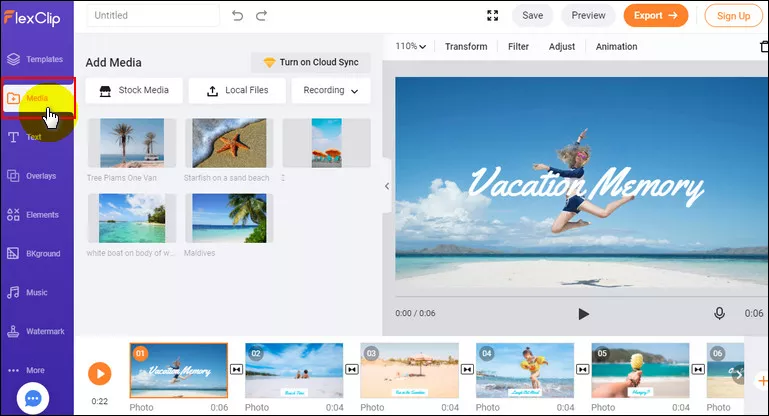
Image Board: Upload Your Pictures
Turn to the Music section to add music to the pictures or video clips. Here you can pick one from the extensive music library or add your own song from the computer.
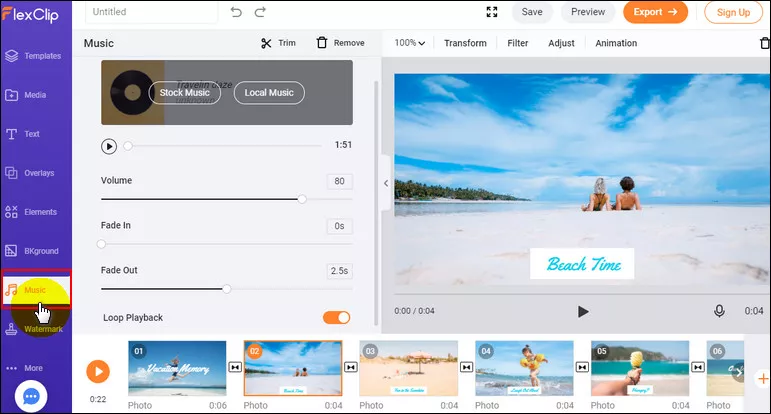
Image Board: Add Music to Your Pictures
Here, you can trim it and adjust the position where the music starts and ends, apply the fade in/out effect to make the music match your photo slideshow perfectly. Also, you can adjust the volume to make the music softer.
While you're in the editor, you can use FlexClip's tools to make any other edits you'd like to your pictures:
- Add & edit text animation to the picture;
- Animate the still photo;
- Add picture, overlays & voice over;
- Crop, filter & adjust brightness or color grade the picture;
Part 2 How to Add Music to Pictures and Videos on Mac
For Mac users, you can also use the iMovie to add music to your photos and videos. iMovie can be said one of the most professional video editors, which can help you ad music to pictures and videos for free.
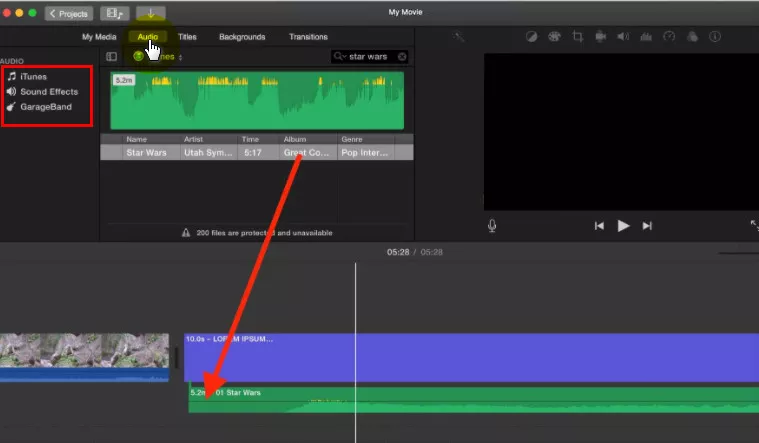
Image Board: Add Music to Your Pictures on Mac
Part 3 How to Add Music to Pictures and Videos on Windows 10
On Windows 10, Photos is an essential app designed to help you to organize your pictures and videos. Using the app, you can view your media files and edit them easily.
The Photos app makes it very simple to add music to your pictures or video clips.
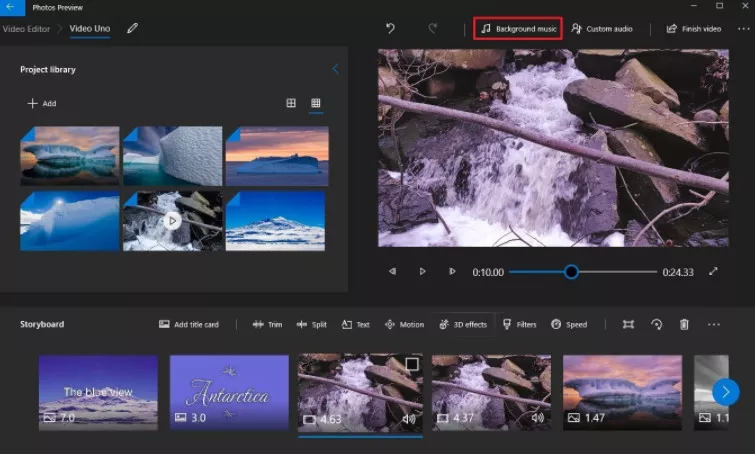
Image Board: Add Music to Your Pictures on Windows 10
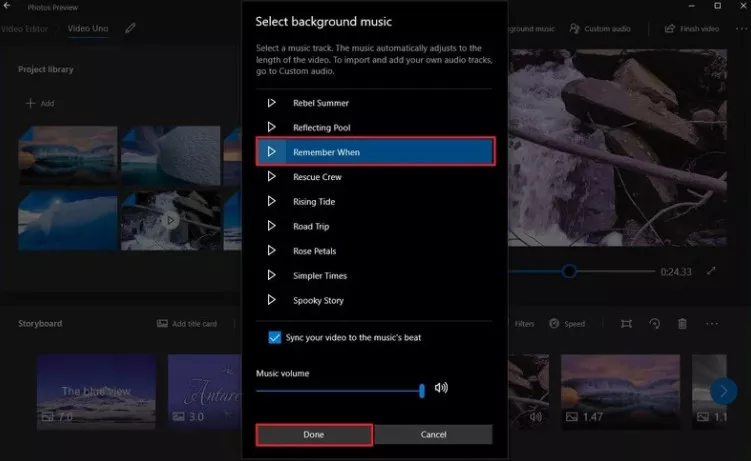
Image Board: Add Music to Your Pictures on Windows 10
Final Words
Ready to begin? Just choose one of the methods above to create your photo slideshow video and have fun adding music to your photos. Help your pictures come to life with music using FlexClip right now!




FlexClip AI Video Maker
Reach professional-quality videos faster with easy editing tools, templates, and smart AI.
Start Now for Free
Hot & Trending
-

Ultimate Tik Tok Guide – How to Tik Tok & How to Make a Tik Tok Video that Gets Likes
-

The Best Birthday Video Maker for You to Create Birthday Videos Online for Free
-

Large Collection of Creative and Funny Birthday Video Ideas for Ones You Care
-

Instagram Story Video Quality Bad After Upload? Fix It!
-

How To Remove/Reduce Background Noise? - 3 Best Free Audio Optimizers
-

Best Video Quality Enhancer: Improve Your Video Quality Easily
-

TikTok Filters Guide: How to Use Filter Effects on TikTok
-

How to Add Multiple Photos to One Instagram Story