Animated GIFs play an essential role in email marketing. They are usually funny and interesting, which can help you attract and amuse your recipients. Besides, they can present your products to customers in a visual way so as to increase your click-through rate.
Animated GIFs are so efficient for email marketing, but do you know how to add them to your emails?
In the following parts, we'll take the most commonly used Outlook and Gmail as examples to show you how to insert a GIF into an email message step by step. Let's get started.
Also Read: Ultimate Guide to Embed Video in Email
Part 1. How to Add a GIF into Outlook Email
1. In Outlook Desktop App
# To add a local GIF, select the Pictures option.
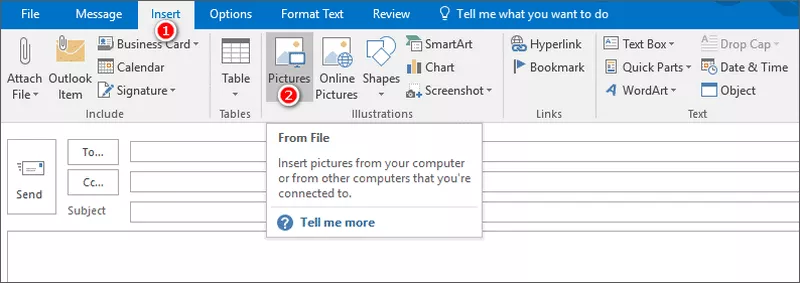
Image Board: Add Local GIF Into Outlook Email
# To add an online GIF, click the Online Pictures button, and open the Bing Images page, where you can search for the GIF you need.
Depict video: Add Online GIF Into Outlook Email
2. In Outlook Web App
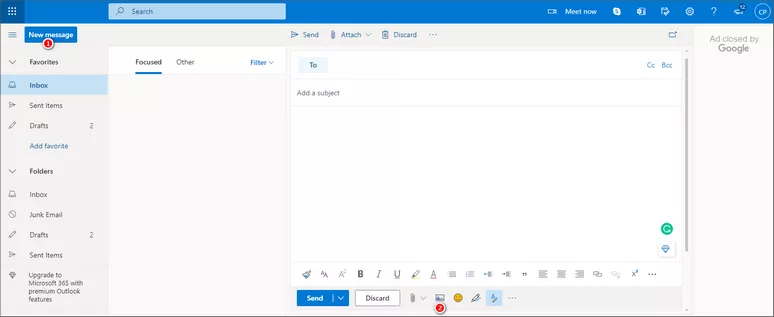
Depict video: Add a GIF in Outlook.com
Part 2. How to Add a GIF into Gmail Email
To Add a GIF from Your Local Device
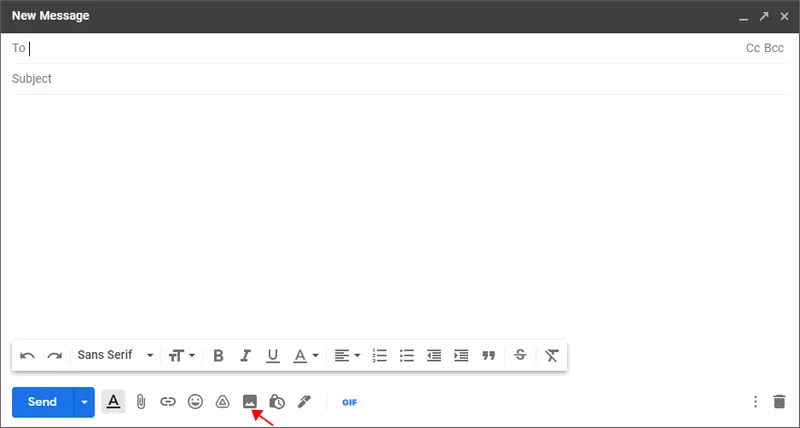
Image Board: Add GIF into Gmail Email
To Add a GIF from the Web
Depict Video: Add GfyCat Add on to Gmai
Bonus Tip: Tips for Adding GIFs into Email
1. Related to Content
Make sure the GIFs you insert are related to the email content. Unnecessary GIFs not only distract the recipients but also make you look unprofessional.
2. Small in Size
The size of an animated GIF should not be larger than 40KB. The main factors that affect GIF size are frame number, pixel, color, and so on. Of these factors, the number of frames is the most critical. Therefore, to make a GIF small in size, the most important thing is to control the time length. Try to keep your GIF under 20 seconds.
3. Not Overdoing It
Overusing GIFs in emails can have negative effects, such as slowing down the loading speed of emails, making readers lose track of your key points, causing visual fatigue, and more.
Conclusion
That’s all for how to put a GIF into Outlook email and Gmail email. If you want to make your email marketing more efficient, don’t forget to add some GIFs to the place where needed.
By the way, we would appreciate it if you could share this blog with your friends.




FlexClip AI Video Maker
Reach professional-quality videos faster with easy editing tools, templates, and smart AI.
Start Now for Free
Hot & Trending
-

Ultimate Tik Tok Guide – How to Tik Tok & How to Make a Tik Tok Video that Gets Likes
-

The Best Birthday Video Maker for You to Create Birthday Videos Online for Free
-

Large Collection of Creative and Funny Birthday Video Ideas for Ones You Care
-

Instagram Story Video Quality Bad After Upload? Fix It!
-

How To Remove/Reduce Background Noise? - 3 Best Free Audio Optimizers
-

Best Video Quality Enhancer: Improve Your Video Quality Easily
-

TikTok Filters Guide: How to Use Filter Effects on TikTok
-

How to Add Multiple Photos to One Instagram Story