Summary:If you are a Snapchat user, you may want to add some awesome music to your Snapchat to make it more attractive. Here let's check this quick guide and learn how to add music to Snapchat.
Snapchat is a "burn after reading" photo-sharing application. With this application, you can take pictures, record videos, add text and pictures, and send them to your friends. When sending a "snapshot" to a friend, the user can set a time to limit the friend's access to the "snapshot" (as of July 2017, the user can choose a time limit between 1 and 10 seconds), then these "snapshots" will be completely deleted from the friend's device and the server on the Snapchat.
Snapchat now allows users to 60-second-long videos and you may want to add some music to your Snap video to make it perfect. Here, we'll show you several simple ways to add music to Snapchat within steps.
You May Like: How to Reverse A Video Online for Free >

Image board: How to Add Music to Snapchat
Part 1. How to Add Music to Snapchat Online
For the purpose of adding music to adding music to Snapchat online, FlexClip is recommended to help you add music to Snapchat videos with ease. Why it? Let's check some outstanding features of this tool:
1.It supports adding music to Snapchat online, which means you don't need to install or download an application on your computer;
2.It offers a lot of stock media including videos and music, you can add music to Snapchat video from its media library;
3.FlexClip is easy-to-use for new beginners, and it has simple interface and advanced features for both professionals and novice;
4.FlexClip also offers a lot of video templates for users, you can choose a video template and customize it to design a Snapchat video yourself.
Now let's follow the steps below to learn how to add music to Snapchat online with the help FlexClip.
Step 1: Visit FlexClip home page and click Make a Free Video button to start.

Image board: How to Add Music to Snapchat - Step 1
Step 2. Then you'll enter FlexClip's templates page. Click + Start From Scratch to upload a video from your computer. Also, you can search or choose a template to start.
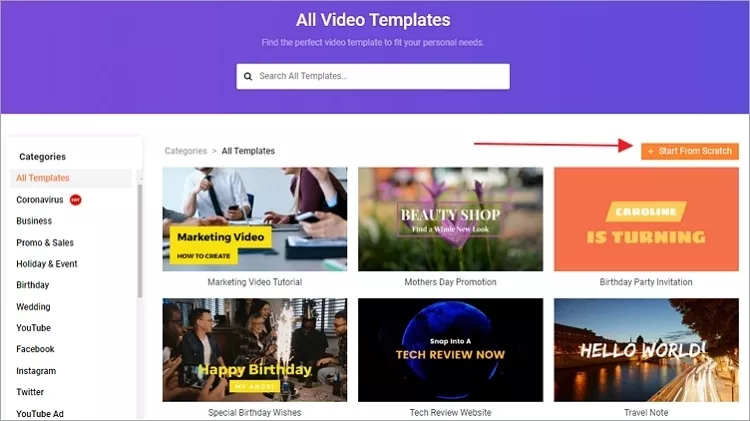
Image board: How to Add Music to Snapchat - Step 2
Step 3. Then you can click Music icon on the left top bar and click + Add music to add music to your Snapchat video.
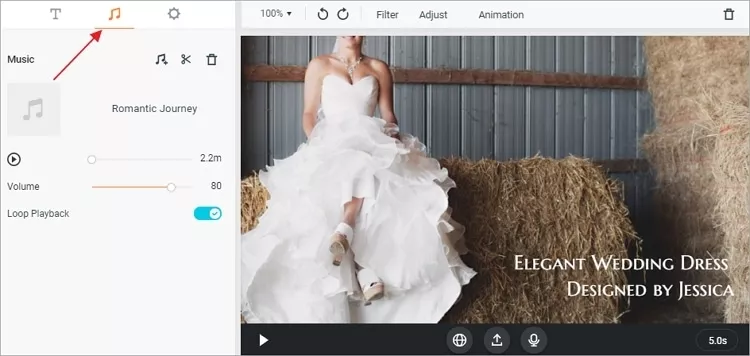
Image board: How to Add Music to Snapchat - Step 3
Step 4. Then can choose music FlexClip media library or click Browse My Files to add music from computer. After adding the music, you can export your videos and upload it to your Snapchat.
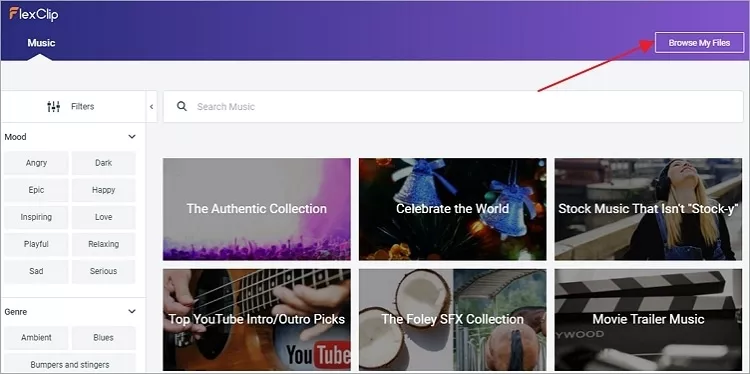
Image board: How to Add Music to Snapchat - Step 4
Part 2. How to Add Music to Snapchat on Phone
There is also an easy way to add music to Snapchat on your smart phone: play a song and record your Snap video simultaneously. This method is available for both iOS and Android phones.
Step 1. Open a music app on your phone and play the song that you want to add to Snapchat.
Step 2. Then launch your Snapchat app. Swiping up from the bottom of the screen and press the “Play” button in the music section to start playing the song again.
Step 3. Swipe down to hide the Control Center, hit the “Recording” button to record and capture your video quickly.
Image board: How to Add Music to Snapchat on Phone
The Bottom Line
That's all about how to add music to Snapchat online and on phone, and we've showed the detailed steps to guide you there. Also, < a href="https://www.flexclip.com/" > FlexClip can help you make videos online with its rich templates and abundant features.




FlexClip AI Video Maker
Reach professional-quality videos faster with easy editing tools, templates, and smart AI.
Start Now for Free
Hot & Trending
-

Ultimate Tik Tok Guide – How to Tik Tok & How to Make a Tik Tok Video that Gets Likes
-

The Best Birthday Video Maker for You to Create Birthday Videos Online for Free
-

Large Collection of Creative and Funny Birthday Video Ideas for Ones You Care
-

Instagram Story Video Quality Bad After Upload? Fix It!
-

How To Remove/Reduce Background Noise? - 3 Best Free Audio Optimizers
-

Best Video Quality Enhancer: Improve Your Video Quality Easily
-

TikTok Filters Guide: How to Use Filter Effects on TikTok
-

How to Add Multiple Photos to One Instagram Story