Summary: How to make fan edits on computer? No matter you want to make a fan edit for Instagram, TikTok or YouTube, you can get an impressive method here.
With the development of the Internet, video editing skills and tools are no longer "unattainable." Some fans use their expertise and imagination to adapt and edit idols' movie and TV series and make them into videos. This kind of short videos are called "fan edit videos", which aims to show your love for a movie, TV show, band or person. If you are planning to make a fan edit video, just keeping reading this page.

Image board: How to Make Fan Edits Video
Also Read: 5 Best Free Video Speed Editor >
Part 1. The Tool to Make Fan Edits Online
To make fan edit video online for free, FlexClip is ready to help. No download or browser extension, FlexClip allows you to make fan edits easily including add music, add text, add transition and more. Let's check main features of this tool:
①Allows making fan edits online easily: add music, add text, add subtitle, spit, merge, trim video, add filter, slow down, speed up, add transition, add watermark, etc.
②Offers all types video templates: you can choose a fan edit video template to customize for YouTube, Instagram, TikTok and more.
③ Millions of royalty free media resources: FlexClip offers abundant media resources including videos and music to help you create perfect fan edit videos.
Part 2. How to Make Fan Edit Videos Online
To make a fan edit video online easily, FlexClip is perfect for you. Just try this online tool to create a fan edit video within simple steps.
Music Day
Step 1. Visit FlexClip and click Make a Free Video to start making a fan edit video online.

Image board: How to Make Fan Edit Videos Online - Step 1
Step 2. Then you'll see all video templates here. You can upload your own video clips or choose a video template to customize.

Image board: How to Make Fan Edit Videos Online - Step 2
Step 3. Then you can add music, add text, add music, add subtitle, spit, merge, trim video, add filter, slow down, speed up, add transition, add watermark, etc.
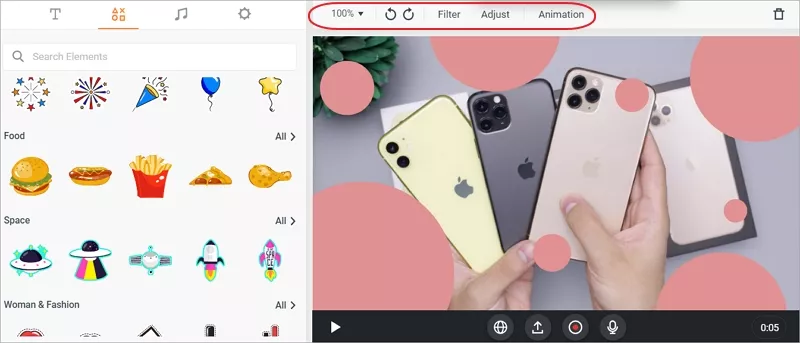
Image board: How to Make Fan Edit Videos Online - Step 3
Quick Tips:
The Bottom Line
That's all for how to make fan edit videos with the help of FlexClip, which can help you make fan edits online without any trouble. Also, you can make a video with templates or edit videos online easily. Just try this tool and explore more!




FlexClip AI Video Maker
Reach professional-quality videos faster with easy editing tools, templates, and smart AI.
Start Now for Free
Hot & Trending
-

Ultimate Tik Tok Guide – How to Tik Tok & How to Make a Tik Tok Video that Gets Likes
-

The Best Birthday Video Maker for You to Create Birthday Videos Online for Free
-

Large Collection of Creative and Funny Birthday Video Ideas for Ones You Care
-

Instagram Story Video Quality Bad After Upload? Fix It!
-

How To Remove/Reduce Background Noise? - 3 Best Free Audio Optimizers
-

Best Video Quality Enhancer: Improve Your Video Quality Easily
-

TikTok Filters Guide: How to Use Filter Effects on TikTok
-

How to Add Multiple Photos to One Instagram Story