Adding sound effects to a video is a crucial step for video making.
Sound effects like birds chirp ambience, distant dogs’ barking, footsteps on bricks, and the rustling of leaves, and machine guns, etc. will instantly evoke viewers’ emotional responses and heighten the atmosphere for a particular scene.
In this post, we will offer you a fantastic source for free and high-quality sound effects and walk you through how to add dramatic sound effects to your videos online using FlexClip and iMovie.
Add Free Sound Effects to a Video Using FlexClip

Here’s What You Will Learn:
How to Add Free Sound Effects to a Video Online Using FlexClip
Well, in actual video or filmmaking, most of the high-quality sound effects are not recorded on the spot. Instead, they are made by professional Foley artists and curated and sold by companies such as Storyblocks, Adobe Stock and Shutterstock, etc.
The most common way to add sound effects to your video is that you either spend time downloading license-free sound effects or pay for commercial sound effects from audio stock companies. However, both methods are time-consuming and not that economical to many.
So, a flawless solution we recommend is using FlexClip, a free and feature-rich online video maker. And here are our reasons:
Versatile and user-friendly FlexClip video maker
Basic Way to Add Sound Effects to a Video Using FlexClip
Upload your video footage in the media library. If you don’t have one, you can click on “Stock Media” > “Video” > search for a stock video > drag the video to the timeline.
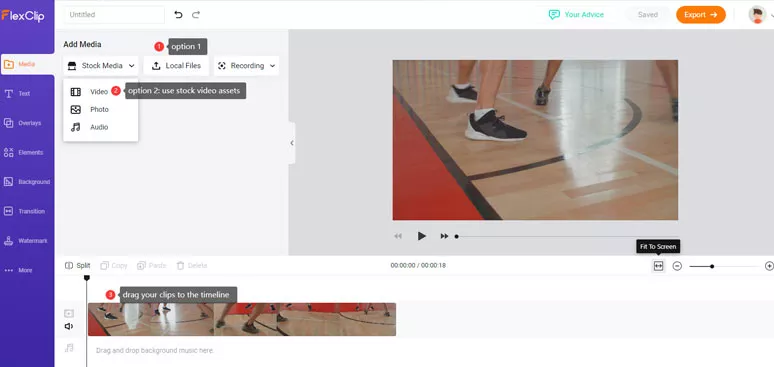
Upload video assets and drag them to the timeline
You may also use the “Fit to Screen” tool to expand the video for easier checking.
Go to “Stock Media” > click on “Audio” on the drop-down menu > enter keywords of sound effects in the search bar > preview and add it to the media library > drag the sound effect on the timeline > use “Fit to Screen” tool and drag the slider of the audio to match the length of the video.
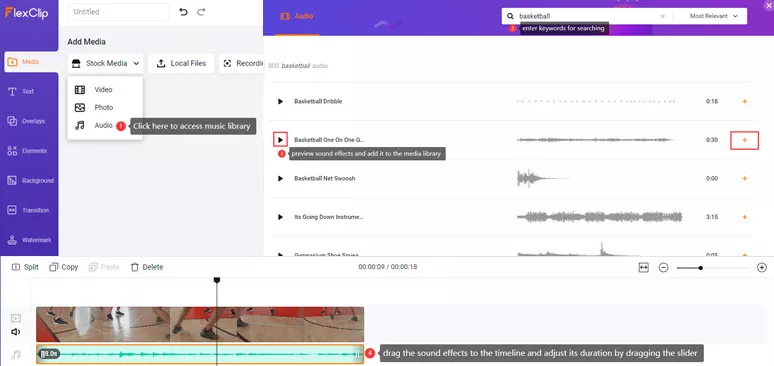
Add the sound effects from the stock audio to the video
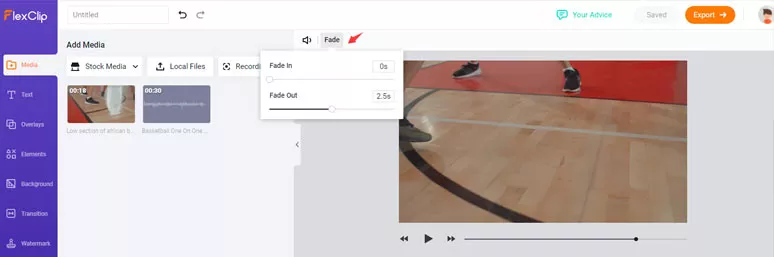
Use fade in/out tool to blend sound effects naturally
Advanced Techniques to Add Sound Effects to a Video Using FlexClip
Having introduced the basic way to add sound effects to a video, now let’s check two more advanced and practical techniques to add sound effects to your videos.
In some cases, you may add multiple sound effects to add dimension to the video. For example, for a historical rocket launch, you can combine “inspiring epic flight” sound effects with “cinematic rocket countdown”.
A demo of adding multiple sound effects to a video using FlexClip
All you need to do is find two sound effects in FlexClip’s video editor and add them to the timeline and drag and drop the slider to trim their duration respectively.
Very often, we wanna add sound effects particularly for a specific frame in a video. Let’s say, you need to add a pop-up sound as you introduce a new book in a video.
To do so, firstly upload your video files to FlexClip> move the playhead to find the particular frame you want the “Pop up” sound to appear > look for the “Pop Up” sound effects from FlexClip’s stock assets > drag and drop the sound effect to the timeline and adjust is duration. Done.
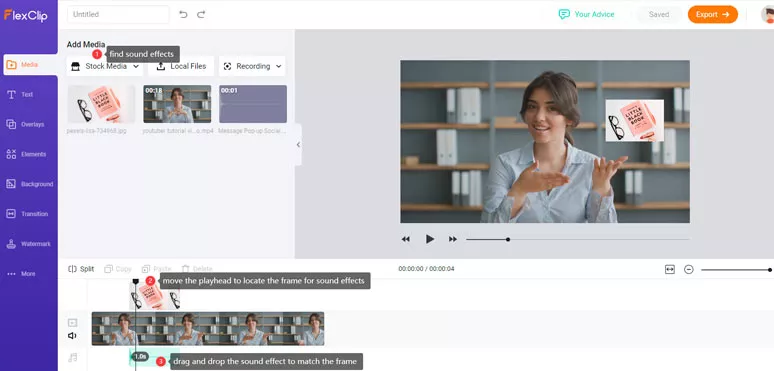
Add sound effects for a particular frame in a video
Bonus Tips: Add Free Sound Effects to a Video on iMovie
Well, not many desktop video editors have built-in sound effects for video editing. An exception is iMovie. If you happen to be a Mac user, iMovie is a workable alternative to adding basic ambient sound effects like “Ocean Surf” and “Dog’s barking” to your video. However, the number and categories of pre-installed sound effects are limited.
Use iMovie’s pre-installed sound effects to add to your videos
Go to the “Audio” tab > click “Sound Effects” on the left sidebar > hit “Effects” > enter “Keywords” in the search bar to find the ideal sound effects like “Ocean Surf” or dogs’ “barking” > drag the sound effect to the timeline. Then you can drag the middle line to adjust its volume or use the slider to trim the sound effects.
Now, It’s Your Move
Adding dramatic sound effects to a video is as important as choosing cinematic BGM for your video. With FlexClip’s royalty-free and high-quality sound effects library and its versatile video editing tools, you can make your video come to life in a breeze. So, start adding sound effects to your videos by FlexClip now.




FlexClip AI Video Maker
Reach professional-quality videos faster with easy editing tools, templates, and smart AI.
Start Now for Free
Hot & Trending
-

Ultimate Tik Tok Guide – How to Tik Tok & How to Make a Tik Tok Video that Gets Likes
-

The Best Birthday Video Maker for You to Create Birthday Videos Online for Free
-

Large Collection of Creative and Funny Birthday Video Ideas for Ones You Care
-

Instagram Story Video Quality Bad After Upload? Fix It!
-

How To Remove/Reduce Background Noise? - 3 Best Free Audio Optimizers
-

Best Video Quality Enhancer: Improve Your Video Quality Easily
-

TikTok Filters Guide: How to Use Filter Effects on TikTok
-

How to Add Multiple Photos to One Instagram Story