


Resize Video Online

Drag & Drop Your Video Here
or
Upload Video
Supports MP4, MOV, M4V, WebM, etc.
Resize Video Online
Resize videos for YouTube, TikTok, Facebook feed, Instagram reels and more.
A mobile phone version of this tool is coming soon. Please visit flexclip.com in your computer browser to use this free tool.
-

Popular Video Formats Supported
Easily resize videos from MP4, MOV, WEBM, M4V, MKV, and more formats.
-

Fully Online
The resizing tool is web-based, which ensures accessibility across different devices.
-

Easy to Use
Convert video to horizontal, square, vertical, and more as you need with great ease.
How to Resize Video Online?
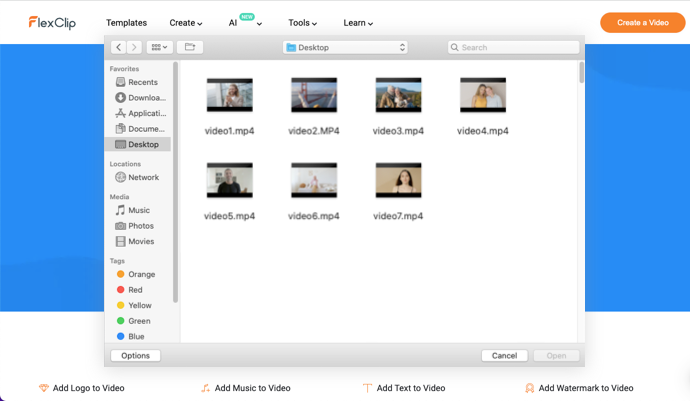
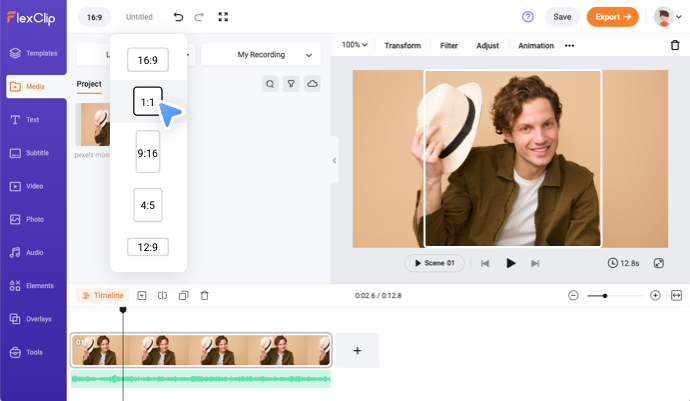
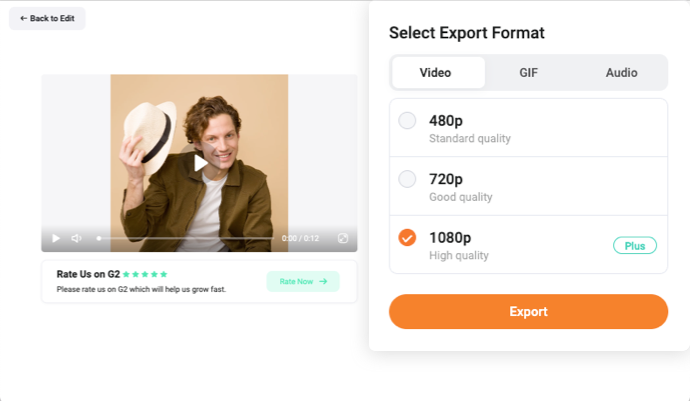
1. Add Video
Upload your video and add it to timeline.
2. Resize Video
Choose the preset aspect ratios to resize the video automatically.
3. Export Video
Download the resized video or share it online directly.
Cutting Tips
The length of the video you uploaded exceeds the limit. To ensure the user experience, it will be trimmed from the beginning of the video to 30 minutes. You can upload more videos in the editor.
Cancel
Got it
Related Tools
- Add Logo to VideoAdd Music to VideoAdd Text to VideoAdd Watermark to VideoCompress VideoConvert VideoFilter VideoMute VideoRecord ScreenTrim VideoVideo BrightnessMerge VideoRotate VideoVideo SpeedSplit VideoVideo TransitionZoom VideoFlip VideoGIF MakerMake a MemeCreate GIF from PhotosConvert Video to GIFConvert Audio to VideoVideo Collage MakerAdd Audio to PhotoGIF EditorMP4 to GIFAdd Image to MP3Add Subtitles to MP4Add Subtitles to VideoAdd Text to GIFOnline Montage MakerMotion Graphics MakerAI Background RemoverPicture in Picture Video EditorAdd Video to AudioExtract Audio from VideoVideo to AudioAudio ConverterVideo CollaborationAudio CutterLoop VideoLoop GIFAudio Converter TestMP4 to MP3 ConverterMP3 ConverterSpeed CurveMP4 CompressorMOV to MP4 ConverterMP4 to MP3 ConverterMP4 to TextVideo Link GeneratorCrop VideoVideo to TextMP3 to TextVideo Collage MakerVideo Collage Maker