Make Video Recaps with Free Recap Templates & AI Tools
Explore FlexClip's free recap video maker to try elaborate free recap video templates, creative assets and easy AI editing for effortlessly compiling photos, footage, audios and contexts into an incredible recap video, slideshow, reel, photo album, collage or animated meme. Begin with a recap video template and swap in your media uploads via AI-Recreate or drag-and-drop editing. Easily clip footage, adjust duration, then tune texts, lower-thirds, transitions, overlays, frames, effects and music for a polish look of your video recap. AI tools of image-to-video, image-to-image, text-to-video, text-to-image, AI image editor and AI text-to-speech feature will help generate and refine recap videos, pictures and voiceovers with prompts. Whether your recap video is for conference, company report, business pitch, debate, movie, sports match or year recap, you can nail it shortly in FlexClip. Try it for free now!
Make Video Recaps Handy video editor
 Rich video templates
 Extensive media library
 Dynamic text animations
- Trusted by:






Free Memorable Recap Video Templates
 PreviewAI Recreate
Annual Recap
 PreviewCustomize
Year Recap
 PreviewAI Recreate
Holiday Vacation Recap
 PreviewCustomize
Relationship Recap
 PreviewCustomize
Family Reunion Recap
 PreviewCustomize
2020 Recap
 PreviewAI Recreate
Romantic Memory Photo Collage Slideshow
 PreviewCustomize
Fun News
 PreviewAI Recreate
Friendship Day
 PreviewCustomize
News Channel Youtube Outro
Options for You to Make Recap Videos
Holiday Vacation Recap Video
Your vacation story must be exciting and unique. So why not share it on a recap video? Make a highlight reel of your adventurous or warm holiday vacation. Meanwhile, you need to spotlight one crucial event, which helps your video orient viewers.

Year Recap Video
A new year is just around the corner. Before it comes, you may need an end-of-year recap video to revisit everything that's happened over the past year. For review, there is a business, student, marriage, working, or family year. Spark your inspiration to create now.

Family Reunion Recap Video
A reunion is a big event for family members. Maybe the whole process of reunion is embedded in your brain. Now store those unforgettable reunion scenes in videos. The recap content can be where your family arrives, a thing you do together, or a dinner you have.

Friendship Recap Video
Possibly the friendship between you and your best friends has been maintained for numerous years or throughout your life. Recap video can witness the friendship that is a valuable acquisition to you. Think about how to start your recap video creation.

Tips and Tricks for Recap Video Production
Ask Yourself Some Questions
You need to know some basics to tell a story better. Who is the target of your video? Have you decided on the video theme? Where do you expect to post? What time is best to launch your videos? Such questions you ought to figure out before production.
Be Sure to Quality Clips or Images
Your recap video content is primarily events you think are successful or crucial. If your images or clips are shot poorly, a video's overall quality will fall as well. Especially those blurry and shaky videos with terrible sound and low-quality pictures harm the first impression of the videos.
Keep Content Short
Concise content is critical in reaching a massive audience on social media. It will be helpful if you make viewers understand the content and purpose of your videos in a short amount of time. Therefore, they can be curious about the follow-up video content.
Choose Catchy Soundtracks
Good music can touch the mind. So appropriate music is essential to add to your videos. And make sure the choice of music suits your event's vibe and does not deviate from your target audience. It requires that you need to comprehend your video content and audiences.
Include a Call-to-action
A goal hides in your recap video. You may want to covey a conception or choice through this kind of video. So it's better to understand it and have a clearer idea of your video CTA. Finally, the results brought by your videos can be more positive and beneficial.
Why You Need to Make a Recap Video

Share Moments
Making a video story is a great way to share your important moments with family and friends.

Evoke Emotion
A video can convey strong emotion and resonate well with audiences.

Improve Engagement
People are more likely to engage, share, and comment on video content.
How to Make a Recap Video in 3 Steps
- 1
Add Media
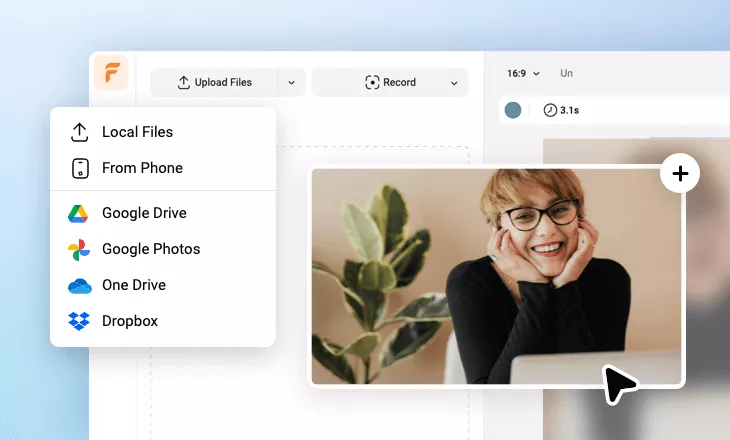
Add videos or photos from computer or stock libraries to the scene.
- 2
Customize
Add text, music, and voiceover to customize your recap video.
- 3
Export
Download your recap video in various ratios and definitions or share it online with the world.